Article
Organise the knowledge of your home
Setting up home automation well is still hard: hundreds of data points to name, link and combine. Sowel makes this work simpler by organising the knowledge of the home on its own. This article explains how.
In this article
When you walk into the living room, you know at once where you are, whether it is warm enough, whether someone is already there and which lamps are on. A home automation system knows none of this. It receives messages: a detector saw movement, a plug draws 40 W, a thermometer reads 21.3 °C. On their own, these messages say neither where the device is, nor what it is for, nor what they mean for the room.
In most home automation solutions, this work falls to the user. Each data point has to be named, put in a room and combined with others in hand-written rules, and everything has to be redone at the slightest change. This is where many users struggle. Yet everything depends on it: the screen that sums up the home, the automations that turn on the light, the modes that get the house ready for the night, the handling of solar surplus.
Sowel takes this work on. The platform organises the knowledge of the home in three layers: standardised and checked data, equipment, and zones. You describe your home once, its rooms and what is in them. Sowel then keeps computing the state of every room, every floor and the whole home.
After a few months, open the list of data a typical home automation system handles. You find hundreds of lines, one per reading and per device, with technical names inherited from the network: sensor.0x00158d0004a2f1_temperature sits next to binary_sensor.pir_lounge_occupancy and switch.plug_3. Each line is an isolated data point, and this way of organising things causes several problems:
- Each brand speaks its own language. One manufacturer sends "temperature", another "temp" or "current_temperature", in degrees or in tenths of a degree. The "on" state is written "ON" by one, "true" by another, "1" by a third.
- The room is only a label. You can put a data point in a room, but the platform computes nothing for it. Knowing whether the living room is occupied, or how warm it is, is left for you to program.
- What you recognise does not exist. The garage door is made of two devices: a relay that drives the motor and a sensor that tells whether it is open. To the platform, these are two unrelated lines, and it is up to you to pair them in every rule.
- Replacing a sensor breaks the rules. The new sensor arrives with another name. Every rule and every dashboard that referred to the old one has to be reworked, and its history starts again from zero.
This list suits the machine, not you. It is up to you to know which sensors are in the living room and how to combine their readings, then to put that into every rule.
- binary_sensor.pir_00_occupancyon
- binary_sensor.pir_01_occupancyoff
- sensor.pirl_illuminance0
- light.0x84fd27_brightness100
- light.0x84fd27_2_stateON
- cover.0x5c0272_position100
- PresenceMotion
- Light level0 lx
- Lights2 of 3 on
- Shutters3 of 3 open
It all starts with the devices: a Zigbee motion detector, a Shelly plug, a Netatmo weather station, a heat pump controlled through its manufacturer's cloud. Sowel discovers them itself, through its integrations. You declare your Zigbee gateway or your Netatmo account once, and the devices appear, with their readings and their commands.
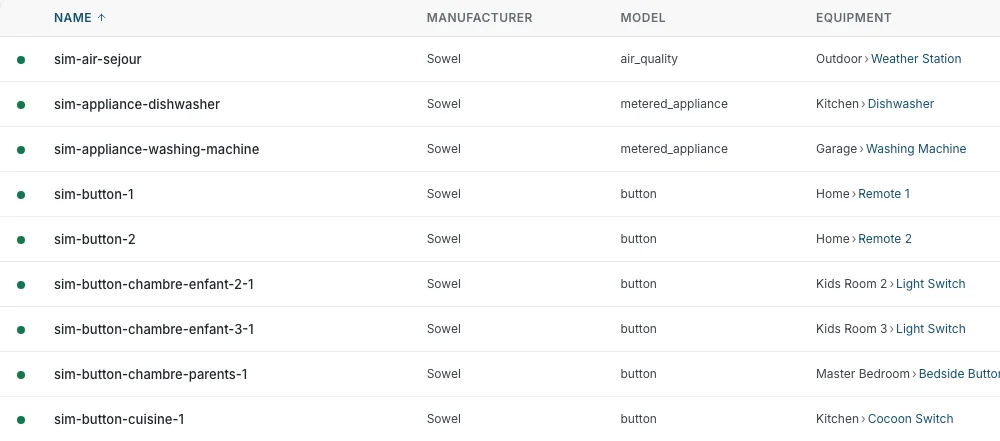
Before going any further, each data point is brought into a common data model defined by Sowel. This model gives each data point:
- A category. There are about forty: temperature, humidity, motion, lamp state, shutter position, power, and so on. Every value received is filed under one of them.
- A unit and a type. A temperature is a number in degrees Celsius, motion is a yes or a no, a position is a percentage.
- A rule for combining. The category also says how the data point combines with the others in the same room: a single motion is enough, temperatures are averaged, power is summed.
Each integration translates what it receives into this model. A temperature is a temperature in degrees Celsius, whether it comes from a Zigbee sensor, a Wi-Fi sensor or a Netatmo station. The integration adapts to the model, so nothing built on top depends on a brand.
- Zigbee sensortemperature: 21.3
- Wi-Fi sensor, in tenthstemp_current: 213
- Netatmo stationTemperature: 21.3
- CategoryTemperature
- TypeNumber
- Unit°C
- Value21.3 °C
Data quality is checked too, as in the pipelines that feed company databases. A reading that is no longer renewed at its device's usual pace is marked as stale, and equipment that stays silent too long goes offline: neither one skews the calculations. An alert warns when a battery runs low. Finally, Sowel checks that each command was actually carried out, for example that the garage door did open, and, when the integration comes back, replays once any command lost during an outage.
A device is not what you recognise in your home. You do not think of the dimmer module hidden behind the switch, you think of the living room sconces. Sowel makes the same distinction.
A device is what sits on the network. Equipment is what sits in the room.
A piece of equipment has a name you choose and a type: dimmable light, shutter, thermostat, water heater, charging point, sensor, and many more. The type is a contract. It says what information the equipment carries and what commands it accepts. A dimmable light has a state and a brightness, and it can turn on, turn off and dim. A shutter has a position, and it can go up, go down and stop. To create a piece of equipment, you choose its type and its room, then its devices: Sowel only offers compatible devices and makes all the links itself.
Separating equipment from devices has several consequences:
- Several devices make one piece of equipment. The garage door brings together the motor relay and the opening sensor. You operate it with a single action, you see whether it is open, and after each command Sowel checks that it did move.
- The same type is operated the same way. A Zigbee sconce and a Wi-Fi sconce are both dimmable lights. The app, the recipes and the modes operate them the same way, whatever the protocol.
- The hardware changes, the equipment stays. If the living room detector fails, you link the new one to the existing equipment. The name, the room, the recipes that use it and the history of its readings stay in place, because they belong to the equipment and not to the device.
- garage_relaystate: OFF
- garage_contactcontact: false
- RoomGarage
- StateOpen
- CommandOpen or close
- After a commandMovement checked
Finally, each type belongs to a family (lighting, openings, climate, water, energy, sensors), which organises each room's page.
Equipment is placed in zones. Zones form a hierarchy: the home contains floors, floors contain rooms, and the outdoors has its own zones, such as the garden, the terrace or the pool. Each piece of equipment is placed once, in its room. Two or three levels are usually enough.
From there, Sowel computes for each zone, with no setup at all, what its equipment says about the space. The calculation rule depends on the information:
- Presence and alerts combine. A room is occupied as soon as one of its detectors sees someone, and Sowel keeps track of how long it has been quiet. A single leak or smoke sensor in alert is enough to put the room in alert.
- Ambient readings are averaged. A room's temperature, humidity and light level are the average of its sensors.
- States are counted. Sowel counts the lights on out of the total, the open shutters, and the open doors and windows.
- Power is summed. A zone's consumption is the sum of its sub-meters.
These calculations climb the hierarchy. The ground floor is occupied as soon as one of its rooms is, and its temperature is the average of all its sensors. The home knows at any moment how many lights are still on and whether a window is open somewhere.
These calculations take special cases into account. An offline sensor is left out of the average, and the room shows which equipment is missing. A pool pump whose state looks like a lamp's is not counted among the lights. Sowel also knows the sunrise and sunset times, computed for where the home is.
Zones are also used to give orders to many pieces of equipment at once: turn off all the lights upstairs, close all the shutters on the ground floor, set all the thermostats in the home. An order given to a zone reaches every piece of equipment concerned, in the zone and in all its sub-zones.
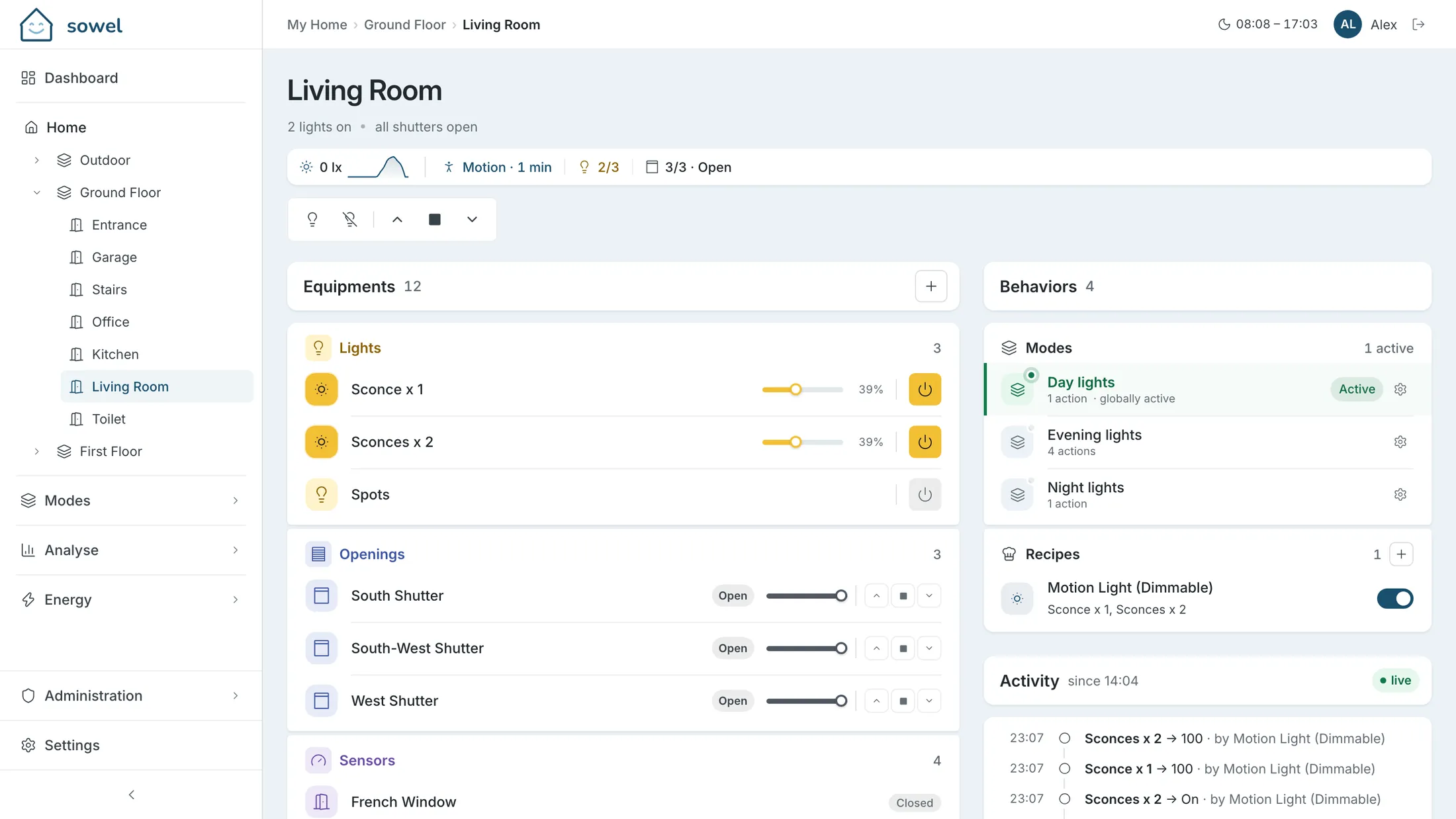
This knowledge is kept up to date continuously. When the living room sensor sees someone, the information climbs at once: the device updates the equipment, the equipment updates the room, and the room updates the floor, then the home. The app, the recipes and the modes are notified at each step and react straight away.
Sowel also keeps the memory of the home. Readings are recorded under the equipment's name, with its room and its category. You can therefore find the history of the living room temperature even if the sensor has changed in the meantime, and consumption breaks down by use.
Once the home is described, everything Sowel offers relies on this knowledge:
- The app. Every room, every floor and the whole home have their summary and their commands, with no dashboard to build.
- Recipes. A recipe is a proven, ready-to-use automation. You apply it to a room, a floor or the whole home and answer a few questions. It relies on what Sowel knows about the zone: is the room occupied, is it bright enough, whatever the number of sensors. The article "Simply optimise the comfort of your home" shows it with the living room lighting.
- Modes. Night, Away or Comfort describe, zone by zone, what changes when they are switched on.
- Energy. The energy arbiter relies on the meters and on the controllable equipment (water heater, charging point, heat pump) to share out the solar surplus. That is the subject of the article "Optimise your solar power production".
Setting up home automation well starts with organising what it knows about the home. Sowel takes this work on, in three layers. Data arrives standardised and checked, whatever the brand. Equipment matches what you see in the room, and it outlives hardware changes. Zones follow the topology of the home and keep computing the state of every space.
Setting up your home then comes down to describing it: its rooms, and what is in them. Everything else follows from this organisation, and it is what then makes it possible to optimise comfort and energy simply.
This organisation also prepares what comes next. Sowel will soon offer an MCP server, the protocol that lets an AI assistant talk to an application. Because the knowledge of the home is already organised, an assistant will be able to reach it easily, understand what is happening in each room and bring ever more value to the people who live there.
Next stepSimply optimise the comfort of your home