Article
Simply optimise the comfort of your home
Letting everyone optimise their comfort and energy use to suit their needs, and do it simply, is the challenge of home automation. Sowel brings an original answer to it, with a different approach.
In this article
Comfort is personal, and different for everyone. Full light when you come home, soft light in the evening, none at night so nobody wakes up: expectations vary from one person to the next and from one moment of the day to another. Waste has to be avoided too, so no light in an empty room and no heating when nobody is home. Every case is different.
Most home automation solutions hand this complex job to scenarios, rules such as "if motion is detected, then turn on the lamp", or to YAML configuration files. These tools work device by device, on raw data: a sensor, a threshold, a time. Yet managing real-life use finely is complex, and the platforms on the market offer no truly effective solution. The complexity is left to the user.
Sowel works differently. The platform organises knowledge of the home, and each use is handed to a recipe, a proven automation that wraps up the complexity and that you set up for your own needs.
Take the most ordinary need: turn on the living room light when someone walks in. It fits in one sentence, but putting it into practice raises many challenges, for example:
- A room often has several detectors. Before deciding anything, their readings have to be combined to know whether the room is occupied: it is as soon as one detector sees someone, and empty once none of them detects movement any more. Light level is the same, averaged over several sensors. This aggregation work has to be written by hand, room by room, and redone each time a sensor is added.
- The switch-off delay is a trap. It must start when the room empties and start again from zero at every new pass. Badly programmed, it leaves the light on for nothing, or turns it off while someone is still there.
- In broad daylight, the light should stay off. A light threshold settles it, as long as it has a margin. Without one, the light flickers as daylight fades and hovers around the threshold.
- Evening and night call for something else. In the evening you want softer light. At night you may prefer it not to come on at all. Each moment of the day adds its own variant of the rule.
- Occupants stay in control. Someone dims the light to watch a film: at the next movement, the rule must not put it back to full brightness, but wait until the room empties before taking over again.
There are two families of tools. "If, then, else" scenarios are built with the mouse. Easy to pick up, they still branch out as soon as you add the evening, the night, the manual gesture and the light threshold. YAML files and scripts go further and allow almost anything. You still have to know how to write them, even with help from an AI, and each difficulty on the list becomes one more condition.
Both families share the same limit: they work at the level of data. They see a detector, a bulb, a lux value, but do not know what a room is or whether anyone is in it. Rebuilding that knowledge is up to you, rule after rule, and then copying it into the hallway, the stairs and the garage.
Sowel manages the home as equipment. A device is what sits on the network: a Zigbee actuator, a door contact, a smart plug. Equipment is what sits in the room and what you recognise: the kitchen spotlights, the living room sconces, the bedroom shutter, the office thermostat, the hallway detector. Each piece of equipment has a type (light, shutter, thermostat or sensor), and Sowel knows what it measures and what it can control. Equipment is grouped into zones: rooms, gathered into floors, themselves gathered into the home.
From there, Sowel computes for each zone, with no setup, the information automations need. A room is occupied as soon as one of its detectors sees someone, and Sowel measures how long it has been calm. Its temperature, humidity and light level are the average of its sensors' readings. Sowel also counts its lights that are on and its open shutters and windows. This information is aggregated automatically along the home's topology: a floor is occupied as soon as one of its rooms is, and the home as soon as one of its floors is.

A recipe is a ready-made automation. You install it from the app's catalogue, apply it to a zone (a room, a floor or the whole home), answer a few questions, and it runs.
Since Sowel has already computed this information, the recipe reasons directly in terms of use. It asks whether someone is in the living room and whether it is bright enough, however many detectors there are. It can devote itself entirely to know-how.
- PIR_00occupancy: true
- PIR_01occupancy: false
- PIRLoccupancy: false
- PIRLilluminance: 12
- PresenceOccupied
- Light level12 lx
- Last movement2 min ago
- SconcesOn
- BrightnessEvening slot
- Switch-offAfter 10 min of calm
For our living room, we pick the "Motion Light (Dimmable)" recipe. It asks its questions: which lamps, how long without movement before switching off, above what light level not to switch on, what brightness depending on the time. We give it an evening slot, from 7 pm to 11 pm, with softer light. At night, a mode pauses it in a single tap.
- Lights
- Sconce x 1, Sconces x 2
- Timeout
- 10 min
- Brightness
- 254
- Lux Threshold
- 50
- Inactive During Day
- Yes
Slot 1
- Start
- 19:00
- End
- 23:00
- Brightness
- 100
You say how you live, the recipe knows how to do it.
Every difficulty listed above is already handled in the recipe:
- it follows presence in the room, however many detectors there are;
- its switch-off delay starts when the room empties and restarts at every new pass;
- it does not switch on above the light threshold, with a 10% margin so it does not flicker, and can stay inactive between sunrise and sunset;
- it sets the brightness by up to three time slots, including one that crosses midnight;
- if someone switches off or changes the brightness by hand, it steps back until the room is empty;
- it keeps its timers through a restart, and a safety can switch the light off after a maximum duration;
- it records what it does in the room's activity, so you know why the light came on.
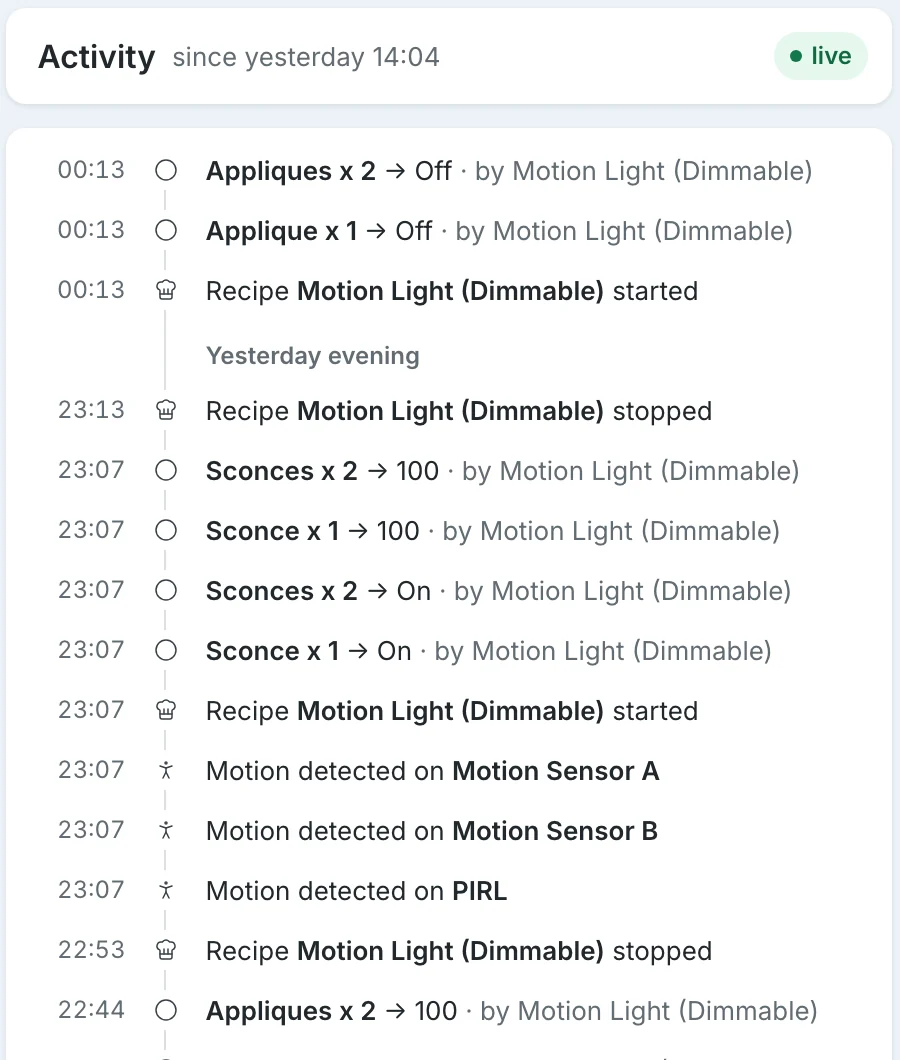
For the hallway, the stairs or the garage, you apply the same recipe again, with answers for each room, without copying anything or maintaining duplicates.
Behind each recipe is tested, proven code. That code stays short for what it does, because the platform has already done the heavy lifting. The recipe asks Sowel whether the room is occupied, how bright it is, how long it has been calm, and gets an answer already computed.
Because Sowel exposes this knowledge in an organised way, through simple interfaces, an AI coding assistant now writes a complete recipe, tests included, in little time. The catalogue can grow quickly.
Everyone picks their own way: use the recipes provided, write their own for their own needs, or even share them in the catalogue so others benefit.
Then there is energy. Well-managed comfort makes the best use of the electricity available, starting with what your solar panels produce. Here too, Sowel centralises what needs to be. When a recipe deals with energy (water heater, electric car, heat pump), it does not decide alone: it asks the energy arbiter for its share of the solar surplus, and the arbiter, which sees the whole home, shares that surplus between appliances. That is the subject of the article Optimise your solar power production.
Comfort is personal, and it has to work with the energy available. Sowel meets this challenge in three layers. The platform knows the home: its rooms, its equipment, who is there and in what conditions. Recipes carry the know-how and take on all the complexity of real cases. The arbiter shares energy between the recipes that ask for it.
You stay in control of what matters, your needs. Sowel helps you meet them as well as possible: it wraps up the complexity, keeps performance in check and makes the right trade-offs.
Next stepOptimise your solar power production